
Phishing attacks are getting more sophisticated. But, they all rely on the same three ingredients: credibility, urgency, and action. Follow the steps below to stay safe.
✅ Check 1: Do the Three-Point Phishing Check
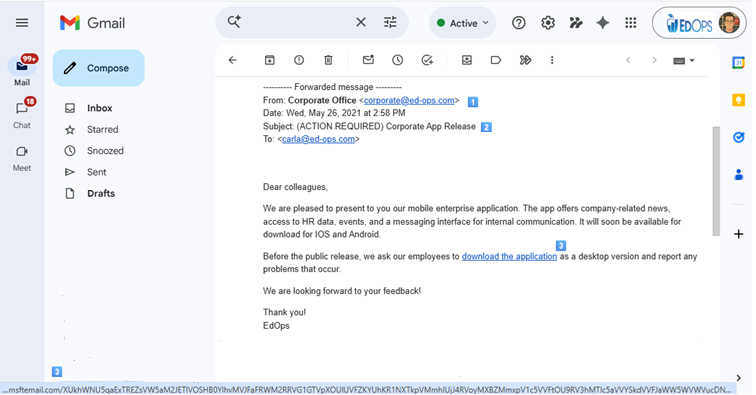
1️⃣ Credibility — Check the sender carefully.
Criminals try to look legitimate by mimicking trusted names.
Review the full email address, not just the display name.
Watch for small anomalies:
micros0ft.cominstead ofmicrosoft.comYour CEO emailing from
dan.theisen13@yahoo.cominstead of the company domain
If it looks “almost right,” it’s probably wrong.
2️⃣ Urgency — Check the subject line and tone.
Phishing emails push you to act quickly before you think. Common lures include:
Invoice or Payment Notice: “Your payment is overdue”
RFP / Bid Invitation: “Official Request for Proposal attached”
Secure Document or Portal Link: “View your confidential file”
HR / Payroll Document: “Your W-2 is ready”
Shipping or Delivery Notice: “Package delivery failed”
If an email makes you feel anxious or rushed... slow down.
3️⃣ Action — Check before you click.
Once they’ve gained your trust and urgency, attackers want you to do something — click a link, open a file, or log in somewhere.
Always hover before you click:
Move your mouse over any hyperlink, image, or button.
In Google Chrome, look in the bottom-left corner for the actual destination URL.
If that web address (domain) doesn’t match the sender’s real domain, or looks suspicious — stop immediately.
If the domain is ancilallarycheese.com, it's from fake phishing vendor, knowbe4.com. Pat yourself on the back and delete the email. Otherwise, report it to Josh.
⚠️ There's no need to Google anyone. Do not try to “solve the crime". Just follow the steps above.
✅ Check 2: When in Doubt, Use Gemini
A recent phishing trick combines a calm email with an inflammatory PDF preview — something like:
“Please review attached RFP”
__RFP_Competitor_30kOutstanding.docx.pdf
These double-extension files (.docx.pdf) are designed to trigger curiosity and trick you into opening them.
If you’re not sure whether an email is legitimate:
In Gmail, click ⋮ → Show Original
In the popup, click “Copy to Clipboard.”
Paste the contents into Gemini and ask:
“Is this email a phishing attempt?”
Gemini will analyze the header and structure for known phishing indicators.
Final Advice
Never enter credentials from a link in an email.
Never open attachments from unknown or unexpected senders.
When in doubt, verify through a known channel: a phone call, Slack, or your internal discussions.